Voice to Text 24
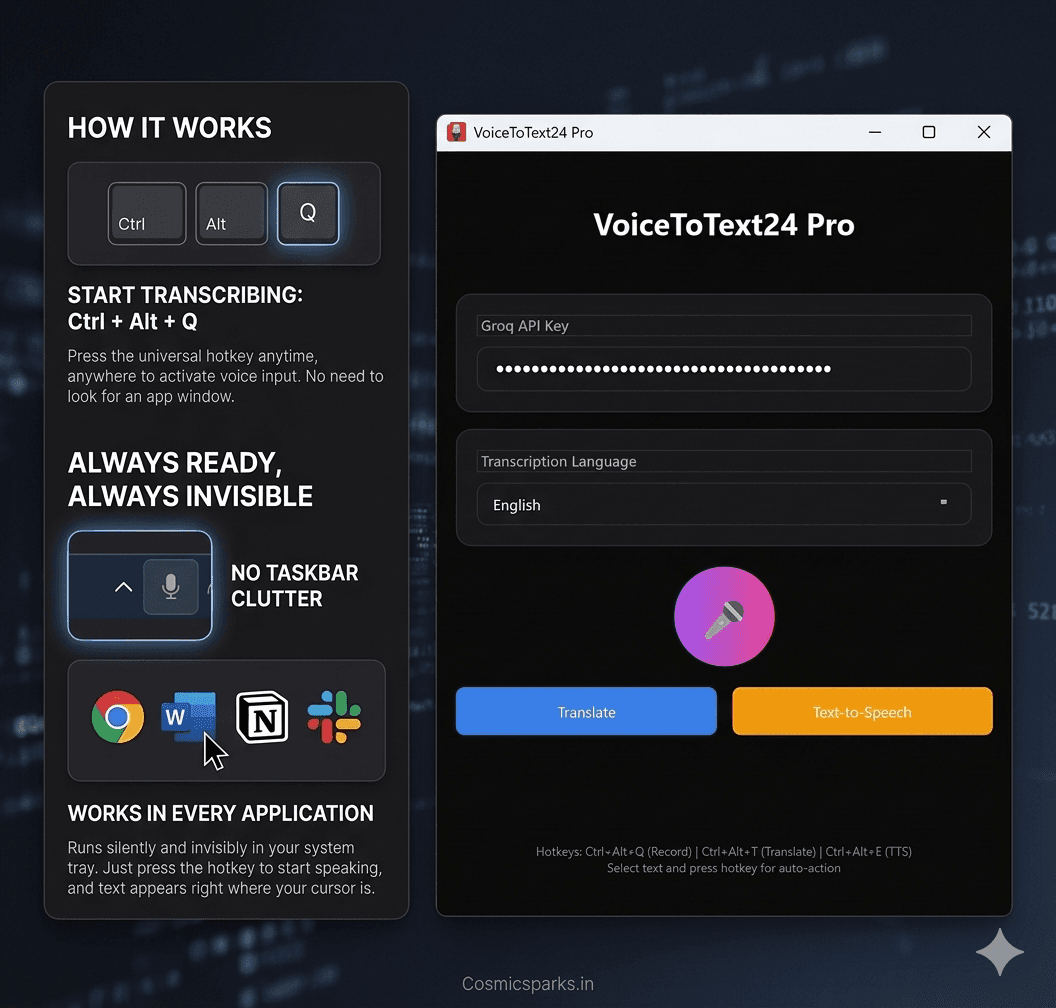
AI voice typing for Windows that works in any application. Powered by Whisper AI. Press Ctrl+Alt+Q anywhere, anytime — and speak. Your words appear instantly where your cursor is. Lightning fast with real-time transcription, accurate with Whisper Large V3 Turbo, and privacy-first with audio processed securely and discarded. One-time purchase with lifetime access. Works in Chrome, Word, Google Docs, Slack, WhatsApp, Notepad, and any app.
One-time payment, lifetime access. No subscription.
Market Opportunity
AI Technology Excellence
Runs Silently in Background
Unlike other voice typing tools, VoiceToText24 lives in your system tray — completely invisible.
Other Tools
- Window always visible
- Manually open each time
- Clutters your taskbar
- Uses CPU always
VoiceToText24
- System tray hidden
- Auto-starts with Windows
- Zero clutter — invisible
- 0% CPU when idle
Just press Ctrl+Alt+Q anywhere, anytime — and speak.
Always ready. Always waiting. Zero hassle.
How It Works
Three simple hotkeys to control your voice transcription
Start Speaking
Press the hotkey and start talking. Your words appear instantly where your cursor is.
Translate
Select any text and press to translate into 10+ languages instantly.
Text to Speech
Select any text and hear it spoken aloud in natural voices.
Everything You Need
Professional-grade transcription at an affordable price. No subscriptions, no hidden fees.
Lightning Fast
Real-time transcription powered by Groq's ultra-fast inference. Your text appears as you speak.
Accurate
Powered by Whisper Large V3 Turbo for industry-leading accuracy across 35+ languages.
One-Time Purchase
Buy once, own forever. No monthly fees, no subscriptions. Lifetime access included.
35+ Languages
Transcribe in English, Spanish, French, German, Hindi, Urdu, Chinese, Japanese, and many more.
Works Anywhere
Press Ctrl+Alt+Q and text appears wherever your cursor is. Notepad, Word, browsers, everywhere.
Privacy First
Audio processed securely and discarded. Your voice data never stored. Runs locally on your PC.
Works Everywhere
Works anywhere your cursor can type. No special integrations needed.
Complete Voice to Text 24 Features
Whisper AI Powered
Powered by Whisper Large V3 Turbo for industry-leading transcription accuracy
Universal App Support
Works in any application - Chrome, Word, Google Docs, Slack, WhatsApp, Notepad, and more
Ctrl+Alt+Q Hotkey
Press anywhere, start speaking - your words appear instantly where your cursor is
Real-Time Transcription
Powered by Groq's ultra-fast inference for lightning-fast results
Privacy First
Audio processed securely and discarded, voice data never stored on any server
Lifetime Updates
One-time purchase includes lifetime updates and improvements
Simple, Transparent Pricing
One-time payment. No monthly fees. Ever.
Basic
Perfect for individual users
- Whisper Large V3 Turbo
- 35+ language support
- Works in any application
- Ctrl+Alt+Q hotkey
- Real-time transcription
- Auto-paste at cursor
- Lifetime updates
- Privacy first - no data stored
Pro
Best for power users
- Everything in Basic
- Translation feature
- Text-to-Speech feature
- Priority support
- Advanced customization
- Bulk export options
- API access
- Team sharing (up to 5)
Who Uses Voice to Text 24
Content Creation
- •Write blog posts faster
- •Draft emails by speaking
- •Create documentation hands-free
- •Write social media content
Business Communication
- •Quick Slack messages
- •Chat with clients
- •Meeting notes
- •Internal memos
Education
- •Take notes faster
- •Write papers by speaking
- •Language learning
- •Accessibility support
Healthcare
- •Clinical documentation
- •Patient notes
- •Medical records
- •Prescription writing
Competitive Landscape
| Solution | Price | Subscription | Languages | Accuracy | Offline | Platforms |
|---|---|---|---|---|---|---|
| Dragon NaturallySpeaking | $500+ | $70/year | 23 | 95% | Windows only | |
| Google Voice Typing | Free | Free | 125+ | 90% | Limited | Browser only |
| Windows Speech Recognition | Free | Free | 80+ | 85% | Windows only | |
| Voice to Text 24 | $25 one-time | No subscription | 35+ | 99% | Cloud-based | Windows 10/11 |
Frequently Asked Questions
How do I get started?
Download the app, get a free Groq API key from console.groq.com (takes 30 seconds), and start using Ctrl+Alt+Q to voice type anywhere!
Is there a subscription?
No! Voice to Text 24 is a one-time purchase with lifetime access. No monthly fees, ever.
Does it work offline?
The app runs locally on your PC. It requires an internet connection only for the Whisper AI transcription via Groq API.
Is my voice data safe?
Absolutely! Audio is processed securely through Groq and immediately discarded. Your voice data is never stored on any server.
What languages are supported?
35+ languages including English, Spanish, French, German, Hindi, Urdu, Chinese, Japanese, and many more.
Can I use it for commercial purposes?
Yes! The Pro license allows commercial use. Each license is valid for 1 device.
Technical Specifications
Start Voice Typing Today!
Download Voice to Text 24 and start typing with your voice in any application. One-time payment, lifetime access.