VoiceToText24: The AI Voice Typing App for Windows That Beats Otter, Dragon & Wispr Flow — For Just $10
A
Admin
Content Writer
April 9, 2026•13 min read
Artificial Intelligence
You type somewhere between 40 and 60 words per minute. You speak at 130 to 150.
That gap — nearly 3x — is time you are bleeding every single day. Writing emails, documenting code, filling reports, taking notes during calls. Every sentence typed is slower than it needs to be.
Voice-to-text has existed for decades. So why are most people still typing?
Because the tools are either too expensive, too clunky, too locked into one app, or they demand a monthly subscription that adds up to hundreds of rupees or dollars every year — for software you never truly own.
At CosmicSparks, we decided to solve this properly. The result is VoiceToText24 — an AI voice typing tool for Windows that we built from the ground up to be invisible, instant, and affordable forever.
Why Every Existing Voice Typing Tool Has a Problem
Before building VoiceToText24, we looked hard at what was available. Here is the honest picture.
Dragon NaturallySpeaking is the industry veteran — 30+ years old, 99% accuracy after extensive training. But it costs around $700 for a perpetual license, requires weeks of voice training before it becomes accurate, and has received virtually no meaningful updates since Microsoft acquired Nuance in 2022. For most users, that investment is simply not justified.
Otter.ai is excellent for meeting transcription — if you are on a Zoom call and need a live summary, it shines. But it charges $17 per month for premium features, it is built for conversations rather than real-time dictation into any app, and your audio goes to their cloud with no clear deletion timeline.
Wispr Flow is polished and cross-platform but costs $15 per month. That is ₹1,500+ every month, or roughly ₹18,000 per year — for voice typing. The math simply does not work for most professionals.
Windows built-in voice typing (Win + H) is free and improving, but it opens a visible window every time, does not auto-paste into your app, uses CPU constantly in the background, and cannot translate or read text aloud. It is a starting point, not a solution.
Google Docs Voice Typing works well — inside Google Docs only. The moment you switch to Word, Notepad, Slack, or any other tool, you are on your own.
The market had two extremes: overpriced legacy software or browser and meeting-specific tools that do not work everywhere. Nothing in the middle for someone who just wants to speak and have their words appear — anywhere, instantly, without a recurring bill.
That is the gap VoiceToText24 fills.
What VoiceToText24 Actually Does Differently
1. It Lives in Your System Tray and Uses Zero CPU When You Are Not Speaking
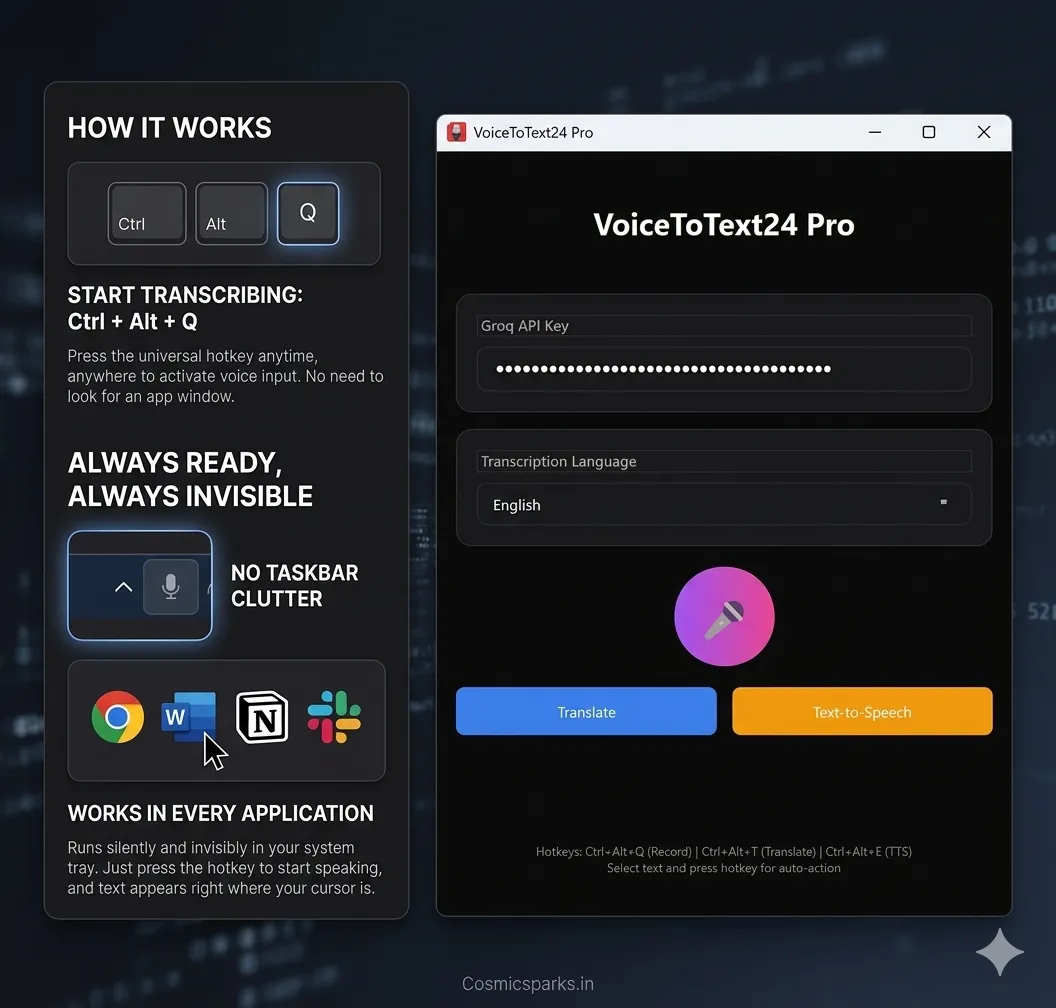
Every other voice tool is visible — a window, a toolbar, a floating widget. VoiceToText24 runs completely hidden in your Windows system tray. You do not see it. It does not clutter your taskbar. It auto-starts with Windows.
When you are not actively dictating, it consumes 0% CPU. When you need it, you press Ctrl + Alt + Q — from anywhere, inside any application — and start speaking. Your words appear exactly where your cursor is.
No switching apps. No clicking a microphone button. No workflow interruption.
2. It Works in Every Single Windows Application
This is the feature that makes the biggest real-world difference.
Press the hotkey in Microsoft Word — it types there. In Chrome — it types there. In Slack, WhatsApp Web, Notepad, your code editor, your email client — it types there. There are no integrations to configure, no plugins to install. If your cursor can be there, VoiceToText24 can type there.
This is fundamentally different from tools like Otter (meeting-only), Google Docs Voice Typing (Docs-only), or Microsoft Word Dictate (Office-only). VoiceToText24 is truly application-agnostic.
3. It Is Powered by Groq's Whisper Large V3 Turbo — The Fastest AI Inference Available
VoiceToText24 uses Whisper Large V3 Turbo running on Groq's inference engine — currently the fastest available hardware for AI speech models. The result is real-time transcription that appears as you speak, not seconds after you finish a sentence.
Accuracy spans 35+ languages including English, Hindi, Urdu, Spanish, French, German, Chinese, Japanese, and more. This makes it particularly powerful for Indian professionals who frequently switch between English and their regional language.
You bring your own free Groq API key — which takes 30 seconds to set up at console.groq.com — and this keeps processing costs low while allowing us to keep the software price permanently affordable.
4. Your Voice Data Is Never Stored
VoiceToText24 processes your audio, transcribes it, and discards it immediately. Nothing is stored. Nothing is used for training. No recordings sit on a server somewhere.
In an era where privacy concerns around voice data are growing, this matters — especially for doctors dictating patient notes, lawyers working on case documents, or executives handling sensitive business conversations.
5. One Price. Forever.
Basic plan: $10 once. Lifetime access. Lifetime updates.
Pro plan: $25 once. Includes translation into 10+ languages using Ctrl + Alt + T and Text-to-Speech playback using Ctrl + Alt + E.
That is it. No monthly billing. No annual renewal. No price hikes after a trial period ends.
Compare that to Wispr Flow at $180 per year or Otter at $204 per year. In year one alone, VoiceToText24 Pro saves you more than $155. By year three, the savings are over $500.
Head-to-Head Comparison
When you line up VoiceToText24 against the most popular voice typing tools available in 2026, the differences are hard to ignore.
Starting with price, VoiceToText24 costs $10 to $25 as a one-time payment and nothing after that — ever. Otter.ai charges $17 every month, which adds up to $204 every year. Wispr Flow charges $15 every month, which is $180 every year. Dragon Professional costs around $700 upfront and requires weeks of voice training on top of that. Windows built-in voice typing is free but extremely limited in what it can actually do.
When it comes to working in every application, VoiceToText24 and Wispr Flow both support any app on your system. Otter.ai is built exclusively for meetings and does not work as a real-time dictation tool in other apps. Google Docs Voice Typing is locked to Google Docs. Windows Win+H has partial support but does not auto-paste and cannot stay truly invisible.
On privacy, VoiceToText24 never stores your voice data — audio is processed and discarded immediately. Otter.ai and Wispr Flow both retain audio on their cloud servers. Dragon processes locally, so data stays on your machine. Windows voice typing sends data to Microsoft servers.
The system tray advantage is unique to VoiceToText24. No other tool on this list runs completely hidden with zero CPU usage when idle. Every competitor either shows a visible window, keeps a floating toolbar on screen, or runs background processes that consume resources even when you are not dictating.
For language support, VoiceToText24 covers 35+ languages including Hindi and Urdu — a significant advantage for Indian professionals. Otter.ai and Wispr Flow offer limited multilingual support focused primarily on English. Dragon supports specialized vocabularies but its multilingual range is narrow outside professional editions.
Finally, setup time. VoiceToText24 takes under 5 minutes — download, install, paste your free Groq API key, done. Otter and Wispr Flow are similarly quick. Dragon is a completely different story — initial setup takes several hours, followed by weeks of voice training before accuracy reaches its peak.
In short, no other tool combines invisible system tray operation, universal app compatibility, privacy-first audio handling, 35+ language support, and a one-time lifetime price — all in the same product.
Who Should Use VoiceToText24
Doctors and Healthcare Professionals
Dictating patient notes, discharge summaries, and EMR entries while simultaneously examining a patient is not possible when both hands are on a keyboard. VoiceToText24 lets doctors speak directly into any EMR or notes application with a single hotkey — saving an estimated 2 or more hours per day on documentation alone.
The audio-never-stored policy also aligns with the sensitivity of patient data.
Software Developers
Code comments, commit messages, documentation, and README files do not require you to type them character by character. Dictate them while you think through the logic. VoiceToText24 works directly inside VS Code, JetBrains IDEs, and any code editor — because it works in any application.
Writers, Journalists, and Content Creators
Getting ideas out of your head and into a draft is the hardest part. Speaking at 140 words per minute is fundamentally faster than typing. VoiceToText24 lets writers capture full paragraphs naturally, then edit — rather than hunting for words while simultaneously managing the keyboard.
Customer Support and Sales Teams
Log ticket notes during a customer call without putting them on hold to type. Summarize sales call outcomes immediately after hanging up. Dictate follow-up email drafts while the conversation is still fresh.
Students and Researchers
Transcribe your own thoughts while reviewing study material. Dictate lecture summaries immediately after class. Create study notes from memory without breaking your review flow to type.
People with RSI, Carpal Tunnel, or Typing Difficulties
For anyone for whom extended typing is painful or impossible, VoiceToText24 is an accessibility tool as much as a productivity tool. At $10, it is the most affordable accessible input solution available for Windows.
The Three Hotkeys That Change Your Workflow
Ctrl + Alt + Q — Start speaking. Text appears wherever your cursor is. Works in any app, any window, at any time.
Ctrl + Alt + T (Pro) — Select any text on screen and translate it into 10+ languages instantly. Reading a French email? Select it, press the hotkey, and read it in English.
Ctrl + Alt + E (Pro) — Select any text and hear it spoken aloud in a natural voice. Review documents by listening. Proofread without staring at the screen.
Three hotkeys. Everything you need. Nothing you do not.
Pricing Breakdown
Basic — $10 one-time payment
Everything you need for daily voice dictation: AI-powered transcription, 35+ languages, works in any application, auto-paste at cursor, lifetime updates included.
Pro — $25 one-time payment
Everything in Basic, plus built-in translation to 10 languages, Text-to-Speech playback, priority support, and early access to new features as we build them.
Both plans cover one device and include free lifetime updates — meaning as VoiceToText24 improves over time, you receive those improvements without paying again.
Frequently Asked Questions
Do I need any technical knowledge to set this up?
No. Download, install, get a free Groq API key from console.groq.com — which takes about 30 seconds — paste it in, and you are done. Total setup time is under 5 minutes.
Does it work offline?
VoiceToText24 uses Groq's cloud inference for maximum speed and accuracy, so an active internet connection is required for transcription.
Can I use it on multiple computers?
Each license covers one device. If you need it on multiple machines, an additional license is required per device.
How accurate is it?
Whisper Large V3 Turbo consistently achieves accuracy in the 95 to 99% range for clear speech. For Indian English, Hindi, and Urdu in particular, Whisper's multilingual training data gives it a significant accuracy advantage over older speech recognition systems.
What happens to my voice data?
Your audio is sent to Groq's infrastructure for processing, transcribed, and immediately discarded. Nothing is stored or retained after transcription is complete.
Is there a free trial?
There is no free trial currently — but at $10, the cost of trying VoiceToText24 is lower than a single month of any competing subscription tool on the market.
The Bottom Line
The voice-to-text category in 2026 is dominated by two kinds of products: legacy tools that are expensive and outdated, and cloud subscription tools built for meeting transcription rather than real-time dictation into any app.
VoiceToText24 is built for a different use case entirely — the individual professional who types all day and wants to stop. It runs invisibly, works everywhere on Windows, respects your privacy completely, supports 35+ languages including Hindi and Urdu, and costs less than a dinner out — once, forever.
We built it at CosmicSparks because we needed it ourselves. We are sharing it because we think you do too.
Get VoiceToText24 at voicetotext24.com — starting from $10, lifetime access.
CosmicSparks IT services is an Indian software company specializing in custom software development, mobile applications, and productivity tools for businesses and professionals.