Tired of Paying Every Month? The 5 Best Voice Typing Apps With No Subscription (Windows 2026)
A
Admin
Content Writer
August 9, 2026•7 min read
Technology Trends
Subscription fatigue is real. By 2026, the average knowledge worker pays monthly for their IDE, their cloud storage, their project management tool, their video calls, their music — and now voice typing software is trying to join the list.
Otter.ai: $16.99/month. Wispr Flow: $16.99/month. Voicy: $8.49/month or $82/year. Dictate+ Pro: $9.99/month. The market has decided that making your voice into text is apparently worth an ongoing membership.
It doesn't have to be. There are several excellent one-time-purchase voice typing apps for Windows in 2026 that give you lifetime access without the monthly invoice. Here's an honest comparison.
Why So Many Voice Typing Apps Went Subscription
Understanding the business model helps you find the exceptions.
Most modern AI voice typing apps route your audio through cloud servers running expensive GPU inference. OpenAI's Whisper API costs money per minute of audio processed. Those costs don't stop — so the subscription doesn't either. The company pays per minute of audio; you pay per month of usage. Everyone gets locked in.
There are two ways to break this cycle:
Run AI locally on your device — no ongoing API costs, but requires a capable GPU and heavier software
Use a free AI inference API — pass the API costs to a free-tier provider so the software can be sold once, used forever
Both approaches exist in 2026, and both produce excellent one-time-purchase options.
The 5 Best No-Subscription Voice Typing Apps for Windows
1. VoiceToText24 ($10 one-time) — Best Value
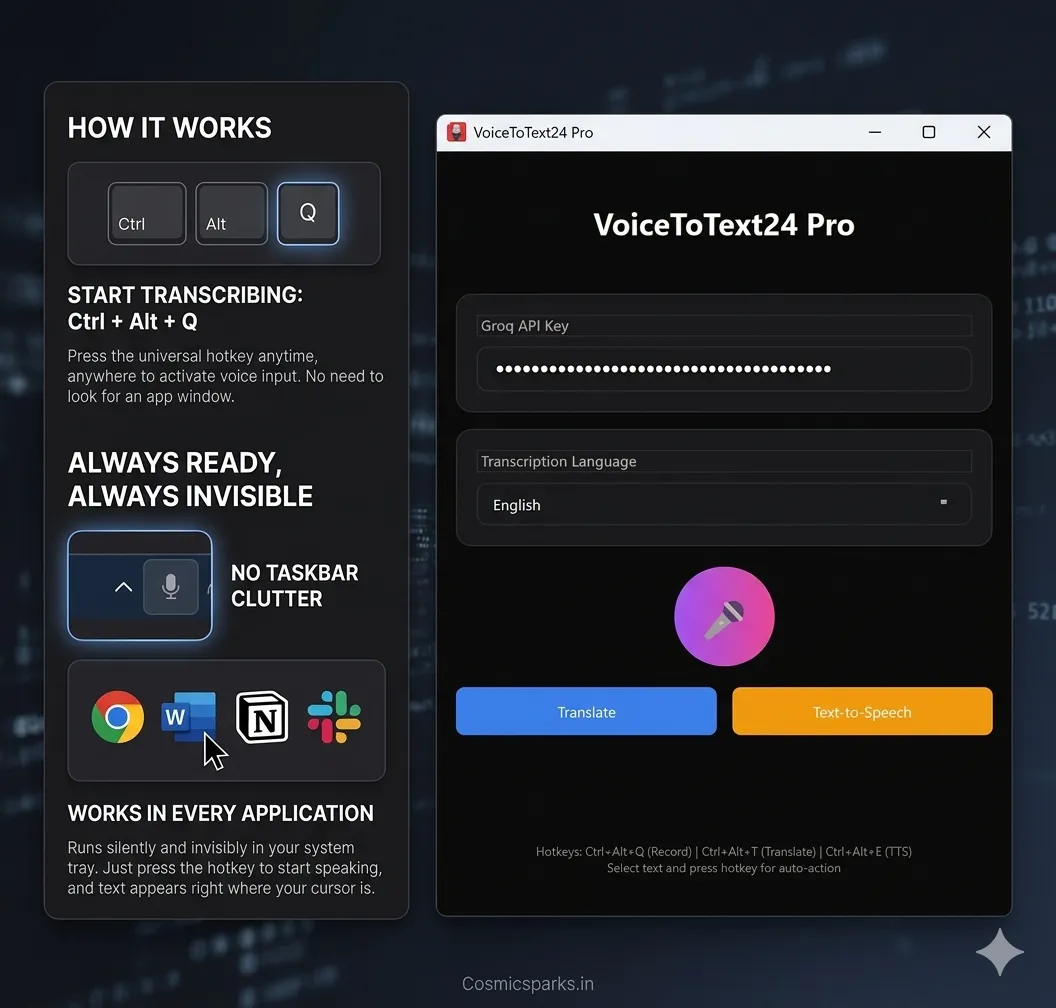
How it avoids subscription: VoiceToText24 uses Groq's free API tier for Whisper inference. You get your own free Groq API key (30 seconds at console.groq.com, no credit card), enter it in the app, and the transcription costs are covered by Groq's generous free tier. VoiceToText24 charges you once for the software and never again.
What you get:
Whisper Large V3 Turbo accuracy (~98.5% word accuracy)
System tray installation — completely invisible until you need it
Ctrl+Alt+Q hotkey activation from any Windows app
35+ language support
Auto-paste at cursor position
Lifetime updates
Pro version ($25): Adds text-to-speech and translation to 10 languages.
The catch: Groq's free API has daily limits. For typical professional dictation (2–4 hours of voice typing daily), you'll likely stay within the free tier. Power users may occasionally hit limits.
Best for: Most people — writers, students, customer support, developers, professionals who want the cheapest Whisper AI experience on Windows.
voicetotext24.com
2. Whisperstream ($29 one-time) — Best for Privacy
How it avoids subscription: Whisperstream runs Whisper entirely on your local GPU. No audio ever leaves your machine. No API costs. One purchase, runs forever.
What you get:
100% local processing — nothing sent to cloud
Microsoft code-signed (no SmartScreen warnings)
Encrypted searchable history of your dictations
Audio file transcription (meetings, voice memos)
Free optional cloud fallback for older hardware without a good GPU
The catch: Requires a reasonably capable GPU for smooth local inference. Older or low-end machines will be slower. No mobile support.
Best for: Privacy-conscious users, healthcare professionals with sensitive content, anyone who needs offline operation.
3. Dragon Professional ($699 one-time) — Best Accuracy for Specialists
How it avoids subscription: Dragon is and has always been a one-time purchase. No subscription, no ongoing fees.
What you get:
Highest tested accuracy for medical and legal vocabulary
Deep Windows integration
Custom vocabulary training that improves over years
Offline operation
The catch: $699 is a lot of money for most users. Overkill for general-purpose dictation. Accuracy advantage over Whisper AI is significant only for specialized vocabulary.
Best for: Doctors, radiologists, lawyers, and other professionals with heavy specialized vocabulary requirements.
4. OpenWhispr (Free, open source) — Best Free Option
How it avoids subscription: It's open source, self-hosted. You run Whisper locally and bring your own API key.
What you get:
Free, open source, community-maintained
Supports local models and your own API keys (OpenAI, Groq, etc.)
Works across Windows, Mac, Linux
Highly customizable
The catch: Setup requires technical comfort. No polished UI. You're responsible for updates and configuration. Not for non-technical users.
Best for: Developers and technically inclined users who want full control and zero cost.
5. Superwhisper Lifetime ($249.99) — Best Cross-Platform
How it avoids subscription: One lifetime purchase covers Mac, Windows, and iOS.
What you get:
Polished, well-maintained app across all three platforms
AI cleanup of transcribed text
Cloud and local transcription options
Active development (frequently updated)
The catch: $249.99 is a significant investment. The Windows version is newer and less feature-complete than the Mac version as of mid-2026.
Best for: Apple ecosystem users who also need Windows support, or users who want the most polished cross-platform experience.
Side-by-Side Comparison
App Price Accuracy Works Offline System Tray Languages
VoiceToText24 $10 one-time ~98.5% ❌ (Groq API) ✅ 35+
Whisperstream $29 one-time ~97% ✅ ✅ 10+
OpenWhispr Free Varies ✅ Basic 35+
Dragon Pro $699 one-time 96–99% ✅ Decent Limited
Superwhisper $249 lifetime ~98% Optional ✅ 35+
The Math Against Subscriptions
Let's be concrete about what subscription voice typing actually costs:
Otter.ai at $16.99/month → $203.88/year → $611.64 over 3 years
Wispr Flow at $16.99/month → $203.88/year → $611.64 over 3 years
Voicy at $8.49/month → $101.88/year → $305.64 over 3 years
VoiceToText24 at $10 one-time → $10 total. Forever.
Even if you compare to the lower-priced subscriptions, VoiceToText24 pays for itself in the first month. Every subsequent month is pure savings.
The only reason to choose a subscription voice typing app in 2026 is if you specifically need features it offers that one-time-purchase alternatives don't — meeting transcription (Otter.ai's specialty), AI-polished writing rewriting (Wispr Flow's specialty), or mobile apps.
For straightforward Windows voice typing — press a hotkey, speak, text appears — there's simply no reason to pay monthly.
Which One Should You Choose?
Most people: VoiceToText24 — $10, done, works immediately, excellent accuracy
Privacy-first: Whisperstream — $29, runs entirely on your machine
Technical users: OpenWhispr — free, open source, bring your own setup
Medical/legal specialists: Dragon Professional — worth $699 if you truly need it
Mac + Windows users: Superwhisper Lifetime — expensive but cross-platform polished
Stop paying monthly for software that types what you say. The one-time-purchase options are just as good — and in 2026, often faster.
Try VoiceToText24 for $10 → https://voicetotext24.com/
One-time payment · Lifetime access · Windows 10/11 · 35+ languages · Powered by Whisper AI