Groq AI + Whisper = The Fastest Voice Typing on Windows in 2026 (And It Costs $10)
A
Admin
Content Writer
August 9, 2026•6 min read
Artificial Intelligence
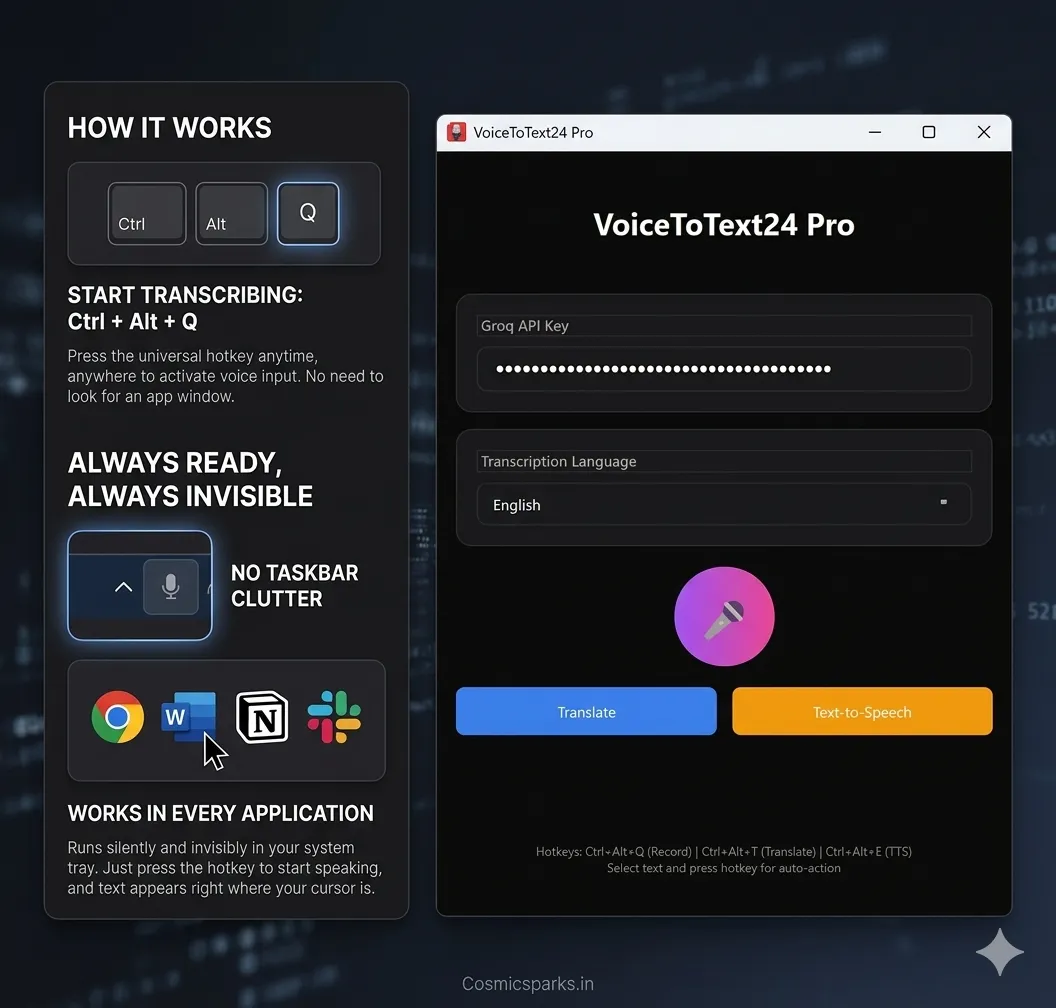
If you've tried voice typing on Windows and given up because it felt slow or inaccurate — the problem wasn't your voice. It was the AI behind the software.
Most dictation apps route your audio through overloaded cloud servers, wait for a response, then paste the text. That delay breaks your flow. You end up speaking, pausing, waiting, correcting — and eventually just going back to the keyboard.
In 2026, that problem finally has a real solution: Groq-powered AI transcription. And if you're on Windows, there's now a dead-simple app that puts this technology in your hands for a one-time $10 payment.
What Is Groq, and Why Does It Matter for Voice Typing?
Groq is an AI chip company that built a completely different kind of processor — the Language Processing Unit (LPU). Unlike traditional GPUs that power most AI servers today, Groq's LPU is designed specifically for fast sequential AI inference. The result: AI models run 10x to 100x faster on Groq hardware compared to standard cloud GPU setups.
For voice typing, this matters enormously. When you speak, your audio gets converted to text by a speech recognition model called Whisper — originally developed by OpenAI and now the industry standard for accuracy. Whisper is a heavy model. On a normal cloud GPU server, transcribing 10 seconds of speech might take 2–4 seconds. On Groq, that same transcription completes in under 200 milliseconds.
The difference isn't just technical. It's the difference between voice typing that feels instant versus voice typing that feels like you're waiting for a dial-up connection.
Groq's API Is Free (Yes, Free)
Here's the part that changes the economics: Groq offers a free API tier. You sign up at console.groq.com, generate a free API key in 30 seconds, and you have access to Groq's ultra-fast Whisper inference at no cost — within generous daily limits that cover typical personal and professional use.
This is how VoiceToText24 keeps its price so low. Instead of running its own inference servers (which would mean passing those costs to users via a monthly subscription), it routes your audio through Groq's API using your own free API key. You control the key. The audio is processed and discarded. No recordings stored anywhere.
How VoiceToText24 Combines Groq + Whisper for Windows
VoiceToText24 is a lightweight Windows application that sits silently in your system tray. It uses:
Whisper Large V3 Turbo — the most accurate version of OpenAI's Whisper speech model, delivering ~98.5% word accuracy across 35+ languages
Groq's LPU inference — meaning that 98.5% accuracy arrives in under a quarter of a second
Global hotkey activation — press Ctrl+Alt+Q from any app, speak, and text appears directly where your cursor is
No switching windows. No clicking microphone buttons. No copying and pasting. You press one key, speak naturally, and your words are already typed before you finish the sentence.
The app consumes 0% CPU when idle — it's truly invisible until you need it. There's no taskbar clutter, no floating dictation window blocking your work, and no background process eating your RAM.
Why Other Apps Can't Match This Speed
Most competing voice typing tools on Windows in 2026 use OpenAI's Whisper API or their own self-hosted models. OpenAI's Whisper API is accurate but typically runs on standard GPU infrastructure — response times are 1–3 seconds per transcription segment. That latency adds up across a full working day.
Apps like Wispr Flow and Voicy build polished UX around subscriptions starting at $8–$20 per month. If you use them for two years, you've paid $192–$480. For a tool that types what you say.
VoiceToText24 uses Groq specifically because it's the fastest public inference API available for Whisper in 2026. The speed isn't a feature they advertise heavily — it's just how the product works.
Who Should Use a Groq-Powered Voice Typing App?
Groq-based transcription is ideal if you:
Write a lot — emails, documentation, reports, social posts — and want your voice to genuinely replace the keyboard, not just supplement it
Work in multiple apps — Groq's speed means the app works smoothly across Word, Chrome, Slack, Notepad, VS Code, and anywhere else your cursor can sit
Type in non-English languages — Whisper V3 Turbo handles 35+ languages with excellent accuracy, and Groq's speed makes multilingual switching seamless
Have RSI, carpal tunnel, or wrist fatigue — fast transcription means you can dictate continuously without frustrating lag breaking your flow
Are tired of subscriptions — Groq's free API tier + a $10 one-time app purchase covers everything
Getting Started in 5 Minutes
Download VoiceToText24 from voicetotext24.com/download
Install on Windows 10 or 11 (64-bit)
Get your free Groq API key from console.groq.com — 30 seconds, no credit card
Enter your API key in the app
Press Ctrl+Alt+Q anywhere and start speaking
That's it. No cloud account, no subscription, no hidden fees. Your audio goes from your microphone → Groq's LPU → back as text → typed at your cursor. The entire round-trip takes under 250ms.
The Bottom Line
In 2026, the fastest AI voice typing on Windows doesn't cost $700 like Dragon or $20/month like the polished subscription apps. It's available right now, powered by the fastest inference hardware in the world, for a one-time payment of $10.
Try VoiceToText24 free → https://voicetotext24.com/
Windows 10/11 only. Free Groq API key required — takes 30 seconds to set up.