Dragon NaturallySpeaking Costs $699. Here's How to Get the Same Accuracy for $10 in 2026.
A
Admin
Content Writer
August 9, 2026•6 min read
Technology Trends
Dragon NaturallySpeaking — now branded as Dragon Professional — has been the gold standard for Windows voice recognition since the 1990s. Its accuracy is genuinely impressive, especially for medical and legal vocabulary. Its price is also genuinely impressive: $699 for a single license, with no guarantee of free updates.
For professionals who dictate for hours daily and need custom vocabulary training built up over years, Dragon is still the right choice. But for the other 95% of people who want to type less and speak more — there are now better options that cost 99% less.
Here's why that changed in 2026, and which alternatives are worth considering.
Why Dragon Was Worth $699 (And Why It Might Not Be Anymore)
Dragon's core advantage was always accuracy — specifically, its ability to learn your voice over time and handle domain-specific vocabulary (medical terms, legal jargon, technical product names) better than generic speech recognition.
That advantage was decisive when the alternatives were Google's basic speech API or Windows' built-in dictation running at 85–90% accuracy. Making 1 error every 10 words is unusable for professional work.
But the AI landscape shifted dramatically between 2022 and 2024 with Whisper — OpenAI's open-source speech model trained on 680,000 hours of multilingual audio. Whisper Large V3, and its faster variant Whisper Large V3 Turbo, now achieve 97–99% word accuracy on standard English — matching Dragon's tested accuracy on most real-world content.
The gap that justified Dragon's price has effectively closed for general dictation use.
Dragon vs Whisper AI: Honest Comparison
Feature Dragon Professional Whisper-based apps
Price $699 one-time $10–$30 one-time (or $7–$20/mo subscription)
Accuracy (general English) 96–99% 97–98.5%
Custom vocabulary training ✅ Excellent Limited or none
Medical/Legal terminology ✅ Best-in-class Good but not specialized
Works offline ✅ Yes Mostly cloud-based
35+ language support Limited ✅ Whisper supports 35+
System tray / hotkey Decent ✅ Purpose-built
Regular updates 2024–2026 Slowing down ✅ Active development
Dragon wins for: Medical transcription, legal dictation, users who have trained Dragon's custom vocabulary over years, specialized offline requirements.
Whisper wins for: Everyone else — general professionals, writers, students, customer support, developers, and anyone who just wants to type less.
The Three Best Dragon Alternatives in 2026
1. VoiceToText24 ($10 one-time) — Best Value
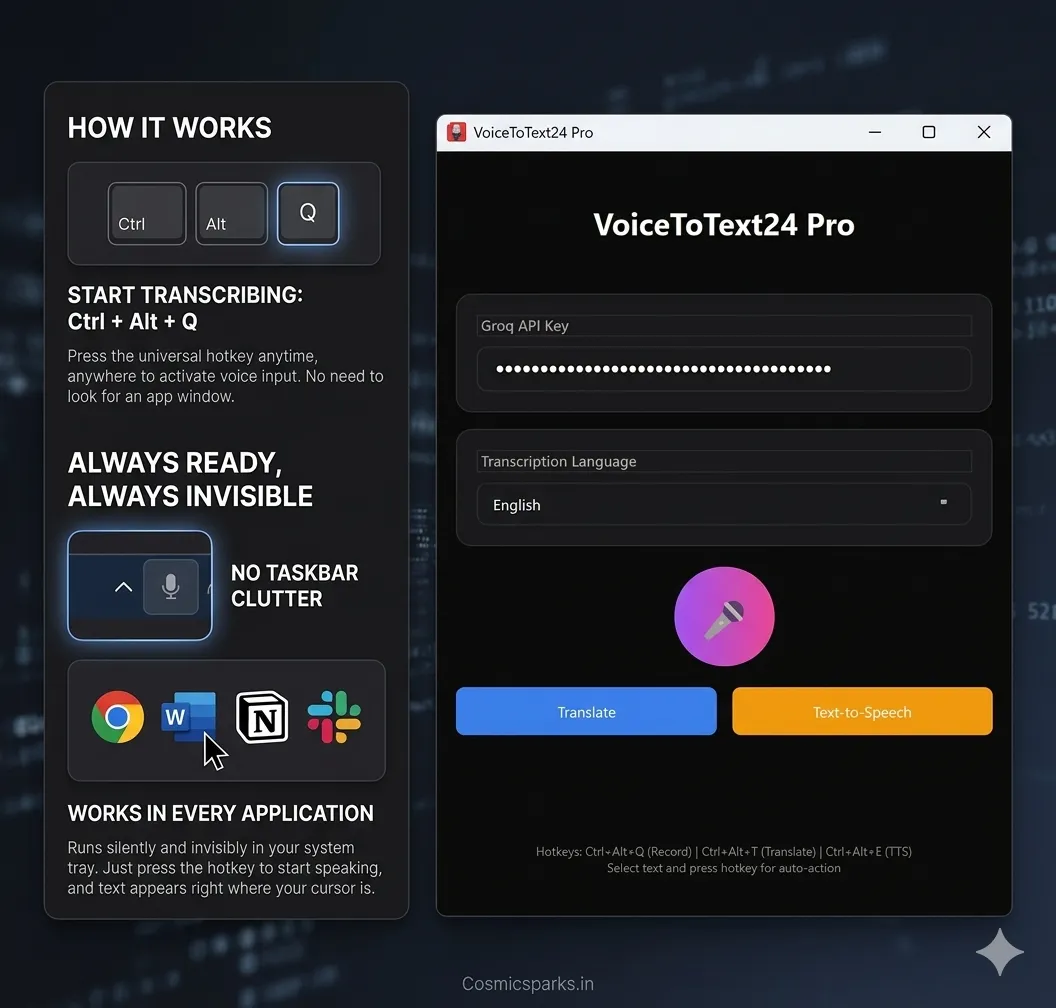
VoiceToText24 is the most affordable Whisper-based dictation app for Windows. It uses Groq's ultra-fast inference to deliver near-instant transcription powered by Whisper Large V3 Turbo. The app lives in your system tray, activates with Ctrl+Alt+Q from any application, and pastes transcribed text directly where your cursor is.
At $10 for Basic (voice transcription + 35 languages) or $25 for Pro (adds translation to 10 languages and text-to-speech), this is the most cost-effective Dragon replacement for users who primarily need accurate dictation across Windows apps.
See VoiceToText24 pricing → voicetotext24.com/pricing
2. Whisperstream ($29 one-time) — Best for Offline Privacy
Whisperstream is a Windows-native app that runs Whisper entirely on your local machine — no internet connection required for transcription (uses your GPU). The transcription never touches a server. At $29 one-time, it's still dramatically cheaper than Dragon, and the privacy story is excellent for sensitive professional work. Requires a capable GPU.
3. Dragon Professional ($699) — Still Best for Specialists
If you are a radiologist, contract lawyer, or have years of voice profile training invested in Dragon — stay with Dragon. The custom vocabulary training and deep Windows integration still justify the price for heavy professional users. For everyone else, it doesn't.
What About Free Alternatives?
Windows 11 includes Voice Access (formerly Voice Typing, Win+H), which works reasonably well for casual use. The limitations become obvious quickly: 85–90% accuracy, no system tray mode, no cross-app reliability, and Microsoft's cloud processes your audio.
Google Docs Voice Typing is excellent — if you only write inside Google Docs. The moment you need to dictate in Outlook, Slack, Notepad, or any other app, it fails.
For serious daily dictation work, free options are a starting point, not a solution.
Making the Switch from Dragon
If you've been using Dragon and want to try a Whisper-based alternative:
Don't cancel Dragon immediately. Run both for two weeks. Dictate the same content in both apps and compare output.
Note which errors differ. Dragon's errors tend to be on general vocabulary; Whisper's errors tend to be on proper nouns. Neither is universally better.
Consider your use case. If 80% of your dictation is emails, reports, and notes — Whisper handles this as well or better. If 80% is specialized medical or legal content with unusual terminology — Dragon may still be worth it.
Calculate the math. At $699 for Dragon vs $10 for VoiceToText24, you save $689. That's 5.7 years of a $10/month subscription. For most people, that math is decisive.
The Bottom Line
Dragon was a marvel for its time. But AI has caught up, and in 2026, you no longer need to pay $699 for professional-grade voice accuracy on Windows.
VoiceToText24 delivers 98%+ accuracy, works in every Windows application, and costs a one-time $10. For most users, it's the Dragon alternative that finally makes sense — both technically and financially.
Download VoiceToText24 → https://voicetotext24.com/
Works on Windows 10/11. Powered by Whisper AI via Groq's free API.